

SnapPix Studio
Try speed and elevation overlays on a sample ski run. No account needed.
Add speed, elevation and route overlays to footage from your rides, runs and adventures.
Try speed and elevation overlays on a sample ski run. No account needed.
Add GPS overlays to your footage and export locally on Windows or macOS.
In Studio, start with an MP4 or MOV. Add GPS from the same activity to show speed or draw a route.
Open a clip from your camera or phone.
Use detected GPS or add your GPX track.
Match a turn or stop to the same moment in the video.
Place a speedometer or route, preview the edit, and export.

THE SNAPPIX TOOLKIT
Shape your edit. Add your data. Make it yours.
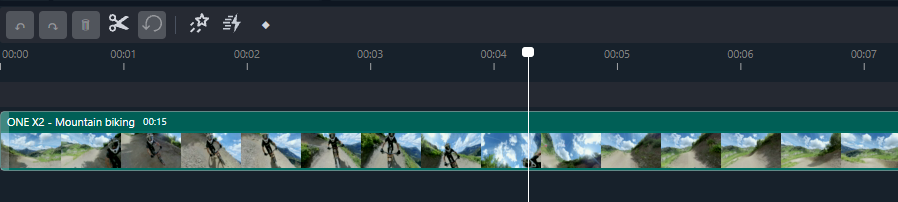
Trim and split your clips, follow your footage in the thumbnail strip, and use the playhead to preview the moment you want. Build your story on a visual timeline.
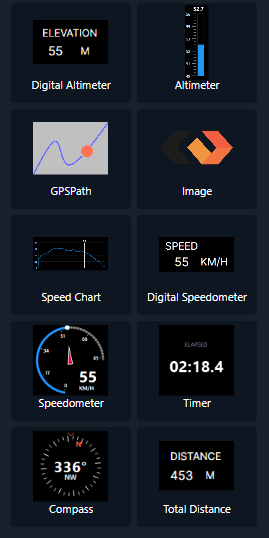
Turn telemetry into a visual part of your story. Add speedometers, GPS paths, elevation, a compass and more—then position and resize them on your video.
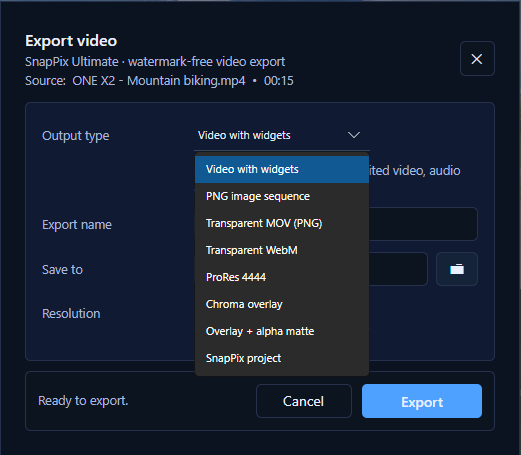
Export a finished video with widgets, a PNG image sequence, or an overlay for another editor. Choose transparent MOV/WebM or ProRes 4444, chroma or alpha-matte output—or export your SnapPix project.
Free includes watermarked Full HD exports. Higher resolutions require Pro.

YOUR NEXT CREATIVE STEP
Choose the tools you need. Your footage and projects stay yours.
Bring your footage to life with the essentials.
Your everyday essentials
A clean, polished finish with room to create.
Everything in Free, plus
Every current feature. Every moment, elevated.
Everything in Pro, plus
Create in your browser. Buy an export pack when you need it.
For the browser editor
Sign in to choose a paid plan and connect your subscription to your SnapPix account. Payments are handled securely by FastSpring.
Open Studio’s sample to try the widgets, or email us for help with your video or GPS track.
